
Smule: Sing, Duet & Karaoke
SmuleMusic & Audio
4.0127.84K Reviews
- Version
- Varies With Device
- Installs
- 100.00M
- Age Rating
- Teen
Screenshots



Our Review of Smule: Sing, Duet & Karaoke
 Analysis by Appyee
Have you ever dreamt of singing your heart out with your favorite artists or belting out tunes in front of an enthusiastic audience without leaving your couch? Well, let me introduce you to Smule: Sing, Duet & Karaoke, the ultimate karaoke experience right in the palm of your hand. I've spent some time navigating through this app, and let me tell you, it's a musical playground that'll keep you entertained for hours.
Where Smule fits today
What I find most useful about Smule is that it treats singing as both a private pastime and a shared activity. You can open it when you have a few minutes to try a chorus, or make a more deliberate recording when you have time to listen back and adjust your performance. That flexibility makes it easier to return to than a karaoke setup that depends on a group being free at the same time.
It is a music and audio app from Smule, and its scale is part of the experience: it has passed 100 million installs and holds a 4.0 average from around 4.1 million ratings. Those numbers suggest a large audience, but they do not guarantee that every song, collaboration, or social interaction will suit you. I would treat the community as a place to explore at your own pace, rather than assuming that a big user base means every session will feel personal.
The current version is 12.8.1, and the app’s history reaches back to its release on December 27, 2012. That long life matters most in a practical sense: Smule is not just a one-off voice recorder, but a familiar karaoke environment built around returning to songs and people. The current version is the evidence of where the app stands now; it is not, by itself, proof that a particular feature has changed recently or that every older recording behaves differently.
For someone deciding whether to install it, the basics are approachable: it is free to start, rated Teen, and runs on Android 6.0 or later. I would still think of “free” as an entry point rather than a promise of unlimited access. In-app purchases range from $0.01 to $99.99 per item, so it is worth checking the purchase screen carefully and deciding what you actually need before spending anything.
Getting Started with Smule
Diving into Smule is as easy as pie. You start by downloading the app from either the Google Play Store or Apple’s App Store. Once you’ve got it installed, signing up is straightforward. You can use your email or social media accounts to get started. As soon as you're in, the app greets you with a sleek interface that’s easy on the eyes and super intuitive. You won’t find yourself getting lost here, promise!
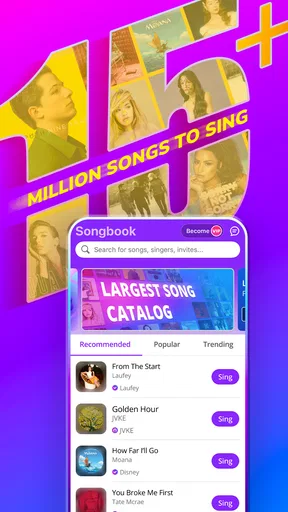
The main dashboard displays a plethora of songs across various genres. Whether you’re into pop, rock, country, or even something more niche, Smule’s got you covered. The app even offers the latest chart-toppers, so you’re never out of date with your song choices. It’s like having a karaoke bar with an ever-updating playlist right in your pocket.
Choosing a song without wasting your singing time
A useful habit is to browse before you are ready to record. When I am picking a song, I first look for something whose phrasing and range feel comfortable, rather than choosing only by title. A track you can sing confidently is often more enjoyable than a favorite that leaves you struggling through every high note. Treat the first attempt as a quick audition: listen to the backing, check where the lyrics come in, and decide whether you want a relaxed run-through or a performance you plan to keep.
This is also where Smule differs from a basic karaoke video or a general music player. A video can be simpler if all you want is lyrics and a backing track in the room, while a music player is better for listening without recording yourself. Smule makes most sense when you want the act of singing to lead somewhere: a saved performance, a duet, or an exchange with other singers. If you only want background music while doing something else, its recording and community focus may feel like extra steps rather than a benefit.
Features That Hit the Right Note
One of the standout features of Smule is the ability to sing duets with famous artists. Yep, you read that right! You can choose to sing alongside celebs like Ed Sheeran or Lewis Capaldi, and it genuinely feels like a dream come true. The app overlays the artists’ pre-recorded videos with your performance, creating a seamless duet experience.
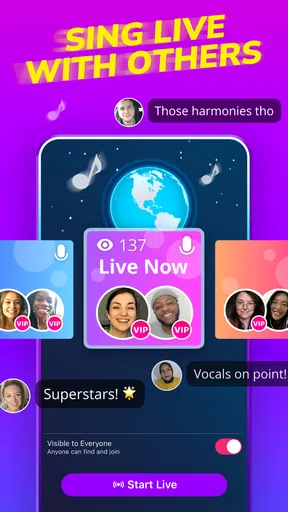
The app also boasts a social aspect, allowing you to connect with a global community of music lovers. You can follow other users, join groups, and even collaborate on songs. It's like having a mini social media platform dedicated to music enthusiasts.
That social layer changes how I would use the app. Rather than treating every recording as something that has to be polished, you can think of a duet invitation as a low-pressure way to join a song someone has started. If you prefer to sing alone, you can keep your sessions personal; if you want interaction, following a few singers whose musical tastes match yours gives you a more focused feed than trying to browse everything at once. I would be selective about what I share, especially when recording video, and make sure a performance is one I am comfortable having others see.
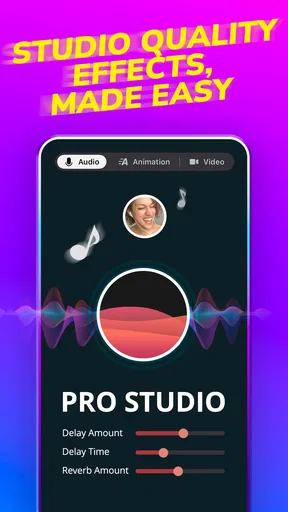
For those who love a bit of creativity, Smule offers a variety of audio effects to enhance your performance. You can add reverb, polish your voice, and even include visual effects in your video performances. It's a playground for anyone wanting to experiment with their vocal style.
Effects are most useful when they support a performance instead of masking it. I would record a short section first, listen through headphones, and adjust the treatment in small steps. Too much processing can make a voice feel less natural, especially on a song with quiet verses or clear spoken phrasing. A restrained setting can help a casual home recording feel finished, while a clean version is often better if your goal is to judge your pitch or hear where your breath control needs work.
Singing Your Heart Out
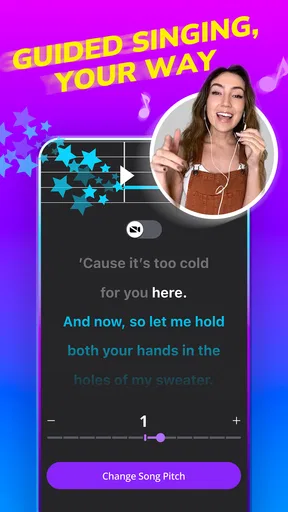
When it comes to actually singing, Smule offers both solo and group options. You can either go solo on your favorite track or join a group to sing with people from all over the world. The app provides on-screen lyrics, so you don’t have to worry about forgetting the words to your favorite songs.
One of the features I particularly enjoyed was the pitch guide. It's a super handy tool that helps you stay on key. The app also gives you feedback on your pitch accuracy, which is great if you’re looking to improve your singing skills.
For a realistic everyday session, I would use it after work or on a quiet weekend afternoon: choose a familiar song, warm up with a short solo take, then listen back once before deciding whether to keep it or try again. That playback step is more valuable than chasing a score. You can notice whether you rushed a line, ran out of breath, or came in late, then focus on one improvement in the next take. The pitch guide can help with tuning, but it cannot replace musical judgment; timing, expression, and comfort matter too.
If you are nervous about singing in front of others, start with a solo recording and get comfortable hearing your own voice through the app. Then try a collaboration when you feel ready. Conversely, if you are looking for formal vocal lessons, detailed coaching, or a private practice tool with no social element, Smule may not be the best fit. Its feedback is a helpful cue for casual practice, not a full substitute for a teacher or a dedicated training routine.
What existing users should expect from changes
The move to version 12.8.1 shows that Smule continues to have a current version, but I would not infer specific new functions from a version number alone. For existing users, the safer expectation is that the app remains centered on its established mix of karaoke performances, collaborations, effects, and social discovery. If you have recordings or routines you care about, it is sensible to check how they appear after an update and avoid assuming that an update automatically changes the way you sing or share.
That distinction matters because a mature app can evolve without changing the core reason people use it. Someone who has built a habit around solo songs may care more about whether the familiar workflow remains comfortable than about a new surface-level feature. A newcomer, meanwhile, should judge the app by how it feels in a first session: can you find a suitable song, record without fuss, and decide whether the social side appeals to you?
Premium Perks
While Smule is free to download and use, there’s also a VIP subscription that unlocks additional features. As a VIP member, you get unlimited access to the entire song library, and you can sing duets with any artist without any restrictions. Plus, you get rid of ads, which is always a bonus in my book.
The VIP subscription is particularly worth it if you find yourself using the app often. It gives you more flexibility and a much wider selection of songs to choose from.
I would not subscribe just because the catalogue looks large. First, spend enough time with the free experience to learn whether you sing regularly, whether the songs you want are available to you in the way you expect, and whether restrictions interrupt your routine. If you only open the app occasionally, paying for broader access may not change your experience enough to justify it. If you sing often and repeatedly run into limits, then compare the available purchase terms in the app with your actual usage before committing.
People also ask whether they need to be confident singers to enjoy Smule. I do not think so: the app is built for taking part, not only for polished performances. The more important question is whether you are comfortable recording your voice and, if you choose, sharing it. A hesitant singer can start privately and use the pitch guide as one point of reference; someone who dislikes hearing recordings of themselves may find the core activity less appealing.
Where it falls short, and what to watch
Smule’s biggest trade-off is that it combines several kinds of activity in one place. The song selection, effects, recordings, and community can make it inviting, but they can also draw attention away from the simple act of singing. If you want a clean, offline-feeling karaoke session with friends gathered around one screen, a conventional karaoke setup may be easier. If you want to record a vocal for a serious music project, a dedicated recording app gives you a more appropriate workflow. Smule is strongest in the middle: casual performance with the option to connect.
Another practical limitation is that a good result depends on your surroundings and how you listen back. A noisy room can distract from your pitch and make a recording less satisfying, so I would choose a quiet spot and use headphones when checking a take. Keep the first session simple rather than trying every effect at once. That makes it easier to tell whether the song suits your voice or whether a sound setting is doing too much of the work.
When evaluating future changes, I would watch for improvements that make it easier to find songs, join collaborations, and manage recordings without adding clutter. Those are the areas most likely to affect an everyday user’s experience. Until a specific change is visible in the app, though, I would keep expectations modest and judge each version by what it actually lets you do, not by assumptions based on its numbering.
Final Thoughts
To wrap it up, Smule: Sing, Duet & Karaoke is a fantastic app for anyone who loves singing and wants to connect with fellow music lovers. Its user-friendly interface, expansive song library, and fun features make it a must-have for karaoke enthusiasts. Whether you’re looking to casually sing along with friends or improve your vocal skills, Smule provides a platform that’s both enjoyable and engaging.
So, if you’re ready to unleash your inner rockstar and have some fun, give Smule a try. Who knows, you might just discover a new passion or even a hidden talent!
Verdict
Strengths of Smule: Sing, Duet & Karaoke
- Wide variety of songs available.
- User-friendly interface.
- Option to collaborate globally.
- High-quality audio effects.
- Engaging community features.
Limitations of Smule: Sing, Duet & Karaoke
- In-app purchases can be costly.
- Requires stable internet connection.
- Ads can be intrusive.
- Limited free song selection.
- Occasional app performance issues.
Similar Picks in This Category
View All
YouTube Music
Google LLC4.4

Samsung Music
Samsung Electronics Co., Ltd.3.8

Spotify: Music and Podcasts
Spotify AB4.3

JioSaavn - Music & Podcasts
Saavn Media Limited4.3

Lark Player:Music Player & MP3
Lark Player Studio - Music, MP3 & Video Player4.6

StarMaker: Sing Karaoke Songs
SKYWORK AI PTE. LTD.4.3
Frequently Asked Questions
What features does Smule offer for karaoke enthusiasts?
Smule provides a wide range of features for karaoke lovers, including solo singing, duets, and group performances. Users can choose from a vast library of songs across various genres. The app also offers voice enhancement tools, video filters, and the ability to join live performances, making it a comprehensive karaoke experience.
Is Smule free to use, or are there any subscription costs?
Smule is free to download and offers basic features at no cost. However, to access premium content and features such as the full song library, advanced voice effects, and ad-free experience, users can subscribe to the VIP membership. The VIP subscription is available on a monthly or annual basis.
Can I use Smule without an internet connection?
While Smule requires an internet connection to access its song library and social features, users can download songs for offline practice if they have a VIP subscription. This feature allows users to sing without being connected to the internet, though social sharing requires connectivity.
How does Smule handle privacy and data protection?
Smule takes privacy seriously and provides users with options to control their privacy settings. Users can choose who can view their performances and interact with them. The app follows standard data protection practices, and detailed privacy policies are available for users to review before signing up.
What devices and operating systems are compatible with Smule?
Smule is compatible with both Android and iOS devices. For the best experience, users should ensure their devices meet the app’s minimum system requirements, which are regularly updated. This compatibility ensures that users across different platforms can enjoy a seamless karaoke experience.
